macOS menubar utility
FileFling
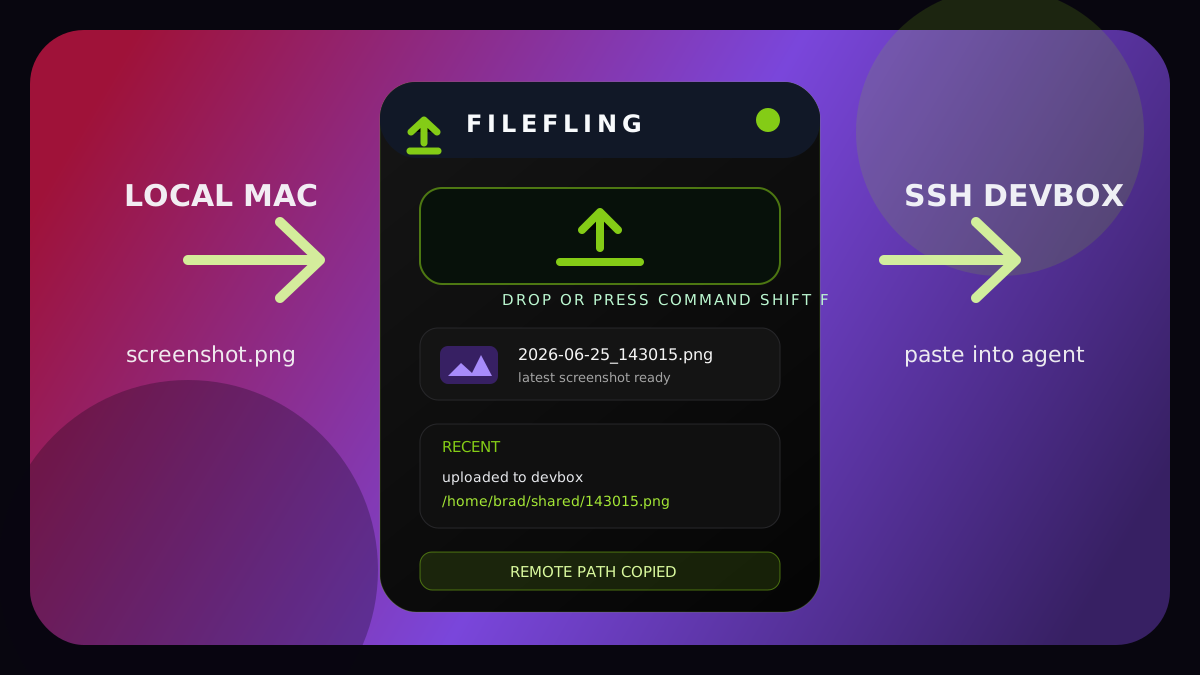
FileFling sends local screenshots and files to a remote machine over SSH/SFTP, then copies the remote path so it can be pasted straight into a terminal, tmux session, or CLI agent chat.
Why I built it
My day to day workflow often involves talking to a coding agent that lives on a remote machine. The agent can inspect files on that machine, but a screenshot from my local Mac is stuck on the wrong side of the SSH session. FileFling closes that gap with one small utility: move the file, copy the path, get back to the conversation.
Highlights
One hotkey from local to remote
Press Command Shift F and FileFling finds the latest screenshot, uploads it, and copies the remote path.
Built on SSH and SFTP
It uses your existing SSH key and the Node ssh2 library, so there is no hosted service in the middle.
Made for CLI agents
Clipboard templates can paste a raw path, Markdown, or a reusable prompt into a remote shell or agent chat.
Safer first run
The onboarding flow can import SSH config, run a real test upload, and store trusted host key metadata.
Core workflow
- 1 Configure an SSH destination or import one from ~/.ssh/config.
- 2 Press Command Shift F or drop a file into the menubar window.
- 3 FileFling uploads the file with SFTP and sanitizes the remote filename.
- 4 The rendered clipboard template is copied automatically.
- 5 Paste the path into tmux, a shell, or a CLI agent conversation.
Product details
The app stays out of the Dock and lives in the macOS menubar. It keeps a latest screenshot preview, supports drag and drop uploads, and stores recent sends so a path can be copied again later.
Settings include multiple destination profiles, per-profile clipboard templates, theme selection, host key review, and SSH config import for concrete host aliases.
The security model is intentionally local-first. The renderer runs with context isolation, no Node integration, sandboxing, a Content Security Policy, and a small validated preload API.
Stack
- Electron
- React
- TypeScript
- Tailwind CSS
- ssh2
- electron-store
- Vitest
- Playwright