A Library for What Comes Out of Agent Sessions
Tags:#astro#claude-codeA good session with a coding agent leaves more behind than code. There’s the decision about which approach to take and why, the research that ruled out the alternatives, the setup steps that finally worked. When the session ends, that material sits in a transcript I won’t reopen.
Artifact Hub is where it goes instead. Every entry is a Markdown file in a Git repo, Astro builds them into a static site, and Claude Code adds and updates entries through a skill while it’s doing the work they come from. I started it on August 6. As of October 19 it holds 59 entries across 25 projects.
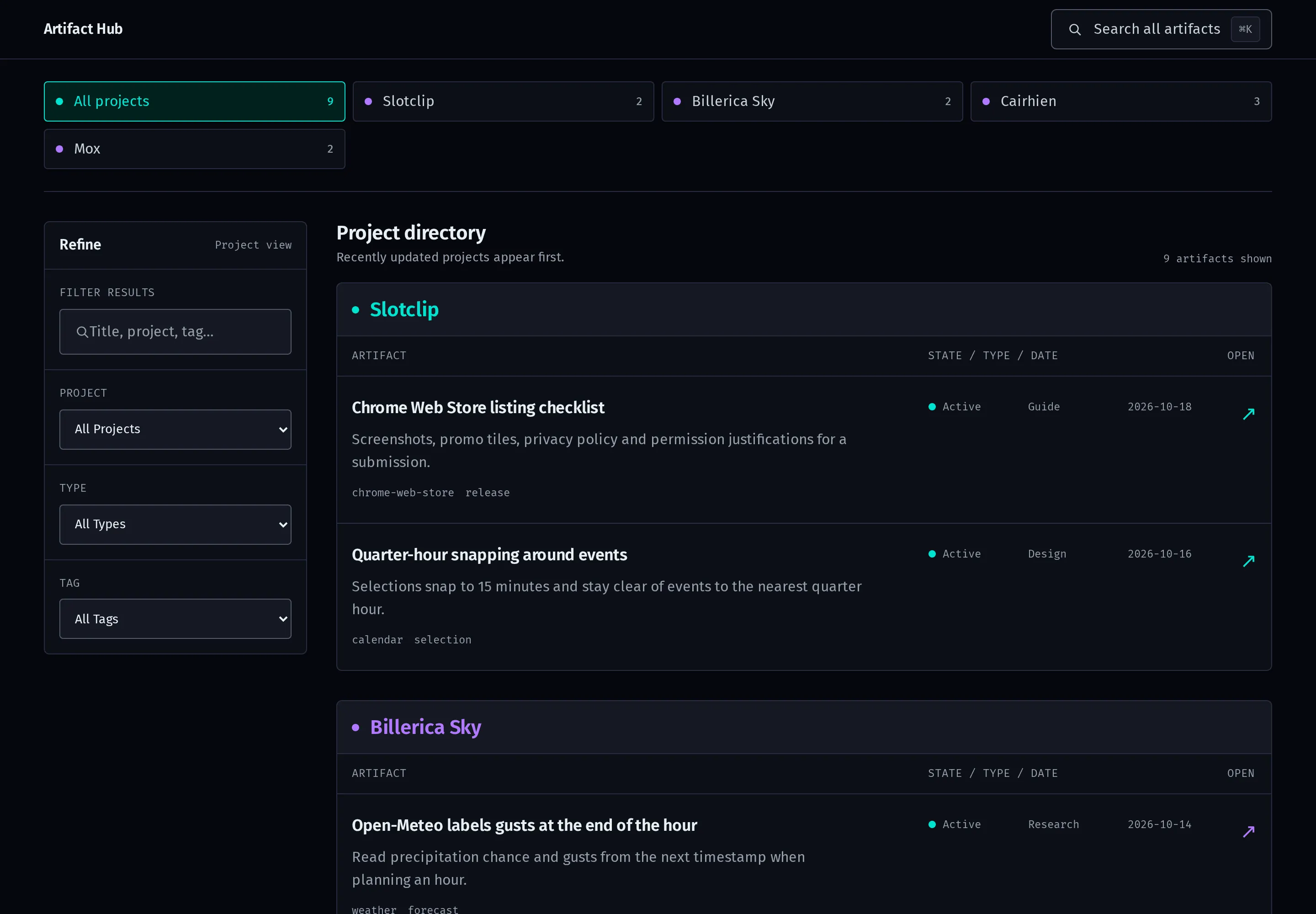
None of these entries are real. Some of the real ones are about work I can’t post, so for these screenshots I built a copy of the hub with nine made-up entries.
One schema
Each entry’s frontmatter goes through a Zod schema in src/content.config.ts, so a misspelled type or a bad date fails the build before it gets near the site:
schema: z.object({
  title: z.string(),
  description: z.string(),
  created: z.coerce.date(),
  updated: z.coerce.date(),
  project: z.string(),
  type: z.enum(['decision', 'design', 'guide', 'note', 'plan', 'reference', 'research']),
  tags: z.array(z.string()).default([]),
  status: z.enum(['active', 'archived', 'draft']).default('active'),
  favorite: z.boolean().default(false),
  source: z.string().optional(),
  related: z.array(z.string()).default([]),
}),
The real 59 break down as 20 references, 11 research results, 10 guides, 7 plans, 6 designs and 5 decisions.
project is the field that matters most. It’s a stable lowercase slug, and the repo’s agent instructions forbid filing anything under general or any other catch-all. Tags do the cross-project work instead of nested folders, and related links neighbors by id, which shows up as a list at the bottom of each entry.
The index groups entries by project and puts the most recently updated project first. Clicking a project button filters to it and writes ?project= into the URL, so the “Back to” link on an entry page returns to that project’s view. Per-project counts appear in the project buttons and nowhere else. The design file says so outright: “No stat strips, and no redundant project label on every artifact.”
Search with no index
There are two ways to search, and neither needs a server, a search library or a generated index file.
The filter box in the Refine panel narrows the directory as I type. Each row carries a data-search attribute with its title, description, project, type, status and tags, and the filter combines that with the Project, Type and Tag selects. Groups with nothing left in them hide.
The search dialog, on Ctrl+K or ⌘K, goes further and matches the full text of every entry. Astro writes each entry’s body into the dialog’s result list at build time:
<a
  href={`/artifacts/${artifact.id}/`}
  data-command-result
  data-search={[artifact.data.title, artifact.data.description, artifact.data.project, artifact.data.type, ...artifact.data.tags, artifact.body].join(' ').toLowerCase()}
>
Each keystroke hides the links whose string doesn’t contain the query. Arrow keys move through what’s left, Enter opens one and Esc closes the dialog.
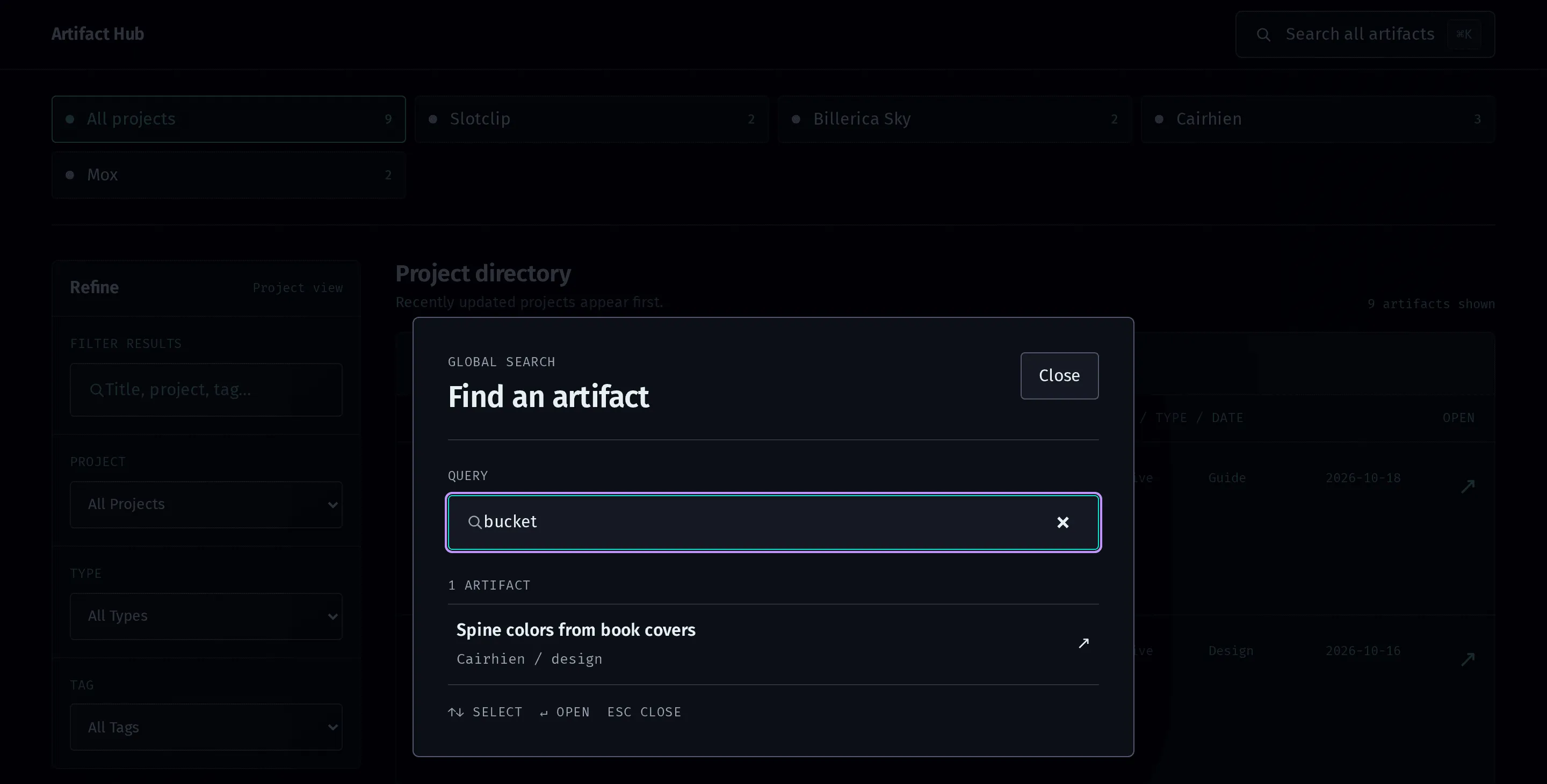
“bucket” isn’t in any title, description or tag in the sample. It’s only in the body of that one entry, which is why it’s the only result.
Putting every entry’s text in every page sounds heavy, and at this size it isn’t. With all 59 real entries, the built index page is about 400 KB, and nginx gzips it to about 120 KB. Everything else on the site is plain static HTML, and the repo’s instructions keep it that way: “Keep JavaScript selective; the core reading experience must remain static HTML.”
Entries that point somewhere else
Some documents have a home in another repo, like a plan that lives next to the code it’s for. The rule there is to leave the document where it is and write an entry that summarizes it, with source set to its path or URL. An entry that’s only a pointer doesn’t count, since a local path on its own is useless to someone reading the site.
That creates a way for entries to go stale: the source changes and the summary doesn’t. pnpm sources checks for it. For every entry with a local source, it reports two things, a source that no longer exists and a source file modified after the entry’s updated date:
const m = stat.mtime;
const changed = `${m.getFullYear()}-${String(m.getMonth() + 1).padStart(2, '0')}-${String(m.getDate()).padStart(2, '0')}`;
if (stat.isFile() && updated && changed > updated) {
  drifted.push(`${file}\n    entry updated ${updated}, source changed ${changed}`);
}
It skips URLs and references into Git history, and it only reads. 35 of the 59 entries have a source, and 4 of those are URLs. It compares dates, not contents, so a flagged entry is a reason to go look, and deciding whether the summary still holds is up to whoever reads it.
The skill
I don’t write most entries by hand. Claude Code has an artifact-hub skill, and its description tells it to use the hub whenever work produces “a durable decision, design, plan, research result, guide or reusable note worth keeping.” The workflow in the skill is short:
- Read the repo’s agent instructions, README and schema first, since they win over anything in the skill.
- Search existing titles, projects, sources and body text before creating anything. If an entry on the subject exists, update it instead of adding a dated duplicate.
- On an update, keep
created, setupdatedto today, and merge the change into the entry instead of appending a transcript. - Run
pnpm check,pnpm buildandpnpm sources, and report a failure as a failure. - Deploy as part of the task, and don’t call an entry published until the deploy succeeds.
It also lists what stays out: routine code edits, status updates, transient debugging, chat transcripts, logs, secrets and credentials, and anything from client work, including sanitized summaries. One line in it shapes how entries read: “Write for someone who hasn’t read the conversation. Lead with the outcome or recommendation, then rationale, evidence, constraints and next steps where they help.”
Deploying
pnpm deploy runs the checks, builds the site, packs dist/ into a tarball and copies it to a VM on my homelab. On the VM it unpacks into a fresh directory, fixes permissions, confirms index.html exists, and only then swaps it in:
rm -rf "$previous_site"
if [ -d "$APP_DIR/site" ]; then
  mv "$APP_DIR/site" "$previous_site"
fi
mv "$new_site" "$APP_DIR/site"
The build that was live a moment ago stays next to the new one as site.previous, so rolling back is one mv. Then the script recreates the container and polls the site up to ten times, two seconds apart, and exits with an error unless it answers.
The container is the stock nginx Alpine image with the site mounted read-only. Its root filesystem is read-only too, with tmpfs for nginx’s cache and runtime files, and it runs as an unprivileged user with every Linux capability dropped and no-new-privileges set. Caddy sits in front and turns away anything that isn’t coming from my LAN or tailnet, so the hub isn’t on the public internet at all.