A Bookshelf Built From My Goodreads Feed
Tags:#astro#booksGoodreads is where I log what I read, and its shelf pages are built for managing a list. I wanted something to look at: covers, grouped by the year I finished them, with a long series folded into one tile so it doesn’t take over a row. cairhien is that shelf. It’s a static Astro site built from my public Goodreads feed, with three pages: what I’m reading, what I’ve read and what’s next.
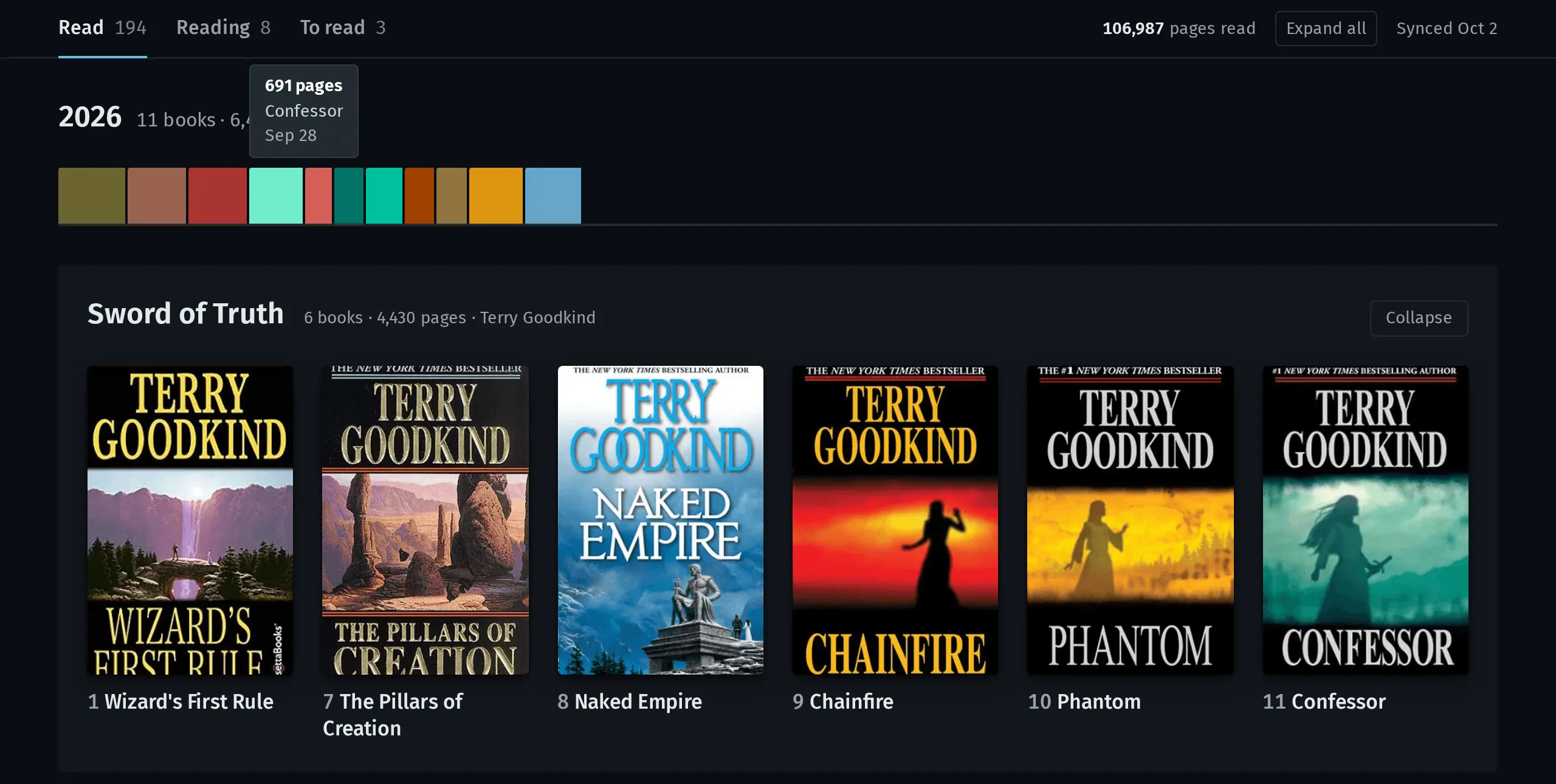
That’s my real shelf from the October 2 sync: 205 books, 194 read, 8 in progress and 3 to read, across 47 series.
Paging the feed
Goodreads publishes an RSS feed for a public shelf, and asking for the #ALL# shelf returns every shelf at once, 100 books per page. pnpm sync asks for the next page until one comes back empty:
for (let page = 1; page <= MAX_PAGES; page++) {
  const res = await fetch(`${FEED_URL}?shelf=%23ALL%23&page=${page}`, {
    headers: { 'User-Agent': 'Mozilla/5.0 (cairhien shelf sync)' },
  })
  if (!res.ok) throw new Error(`Goodreads page ${page}: HTTP ${res.status}`)
  const pageItems: Item[] = parser.parse(await res.text())?.rss?.channel?.item ?? []
  if (pageItems.length === 0) return dedupe(items.map(toBook))
  items.push(...pageItems)
}
throw new Error(`Goodreads feed still returning books after ${MAX_PAGES} pages`)
MAX_PAGES is 50, so the loop can’t run forever if the feed misbehaves. Any bad response throws before anything is written, so the sync either produces a whole snapshot or nothing.
The read dates needed one small fix. Goodreads sends the date I picked as midnight UTC, and converting that through a timezone would move a book finished on January 1 back to December 31 of the year before. The sync reads the day, month and year straight out of the string instead.
The feed module has no Astro imports. The sync runs it directly under Node, and it could move to another framework without changes.
Series live in the title
The feed has no series field. The series is a suffix on the title, and it comes in a few shapes. These are the examples in the code’s comment:
Gentleman Jole (Vorkosigan Saga (Publication) #16)
Citadel (The Palladium Wars #3)
The Farseer Trilogy (The Farseer Trilogy, #1-3)
One regex handles all three: a nested parenthesis inside the series name, an optional comma before the number, and a range like #1-3. The (Publication) qualifier gets dropped. A suffix like (Something Series) with no number says nothing about order, so it comes off the title and the book counts as standalone.
Names also vary between editions of the same series. “Wheel of Time” and “The Wheel of Time” are one series, and so are “Red Rising” and “Red Rising Saga”. Each series gets a key with a leading “the” and a trailing “saga” or “series” removed, and every book in it gets the spelling most of its books use.
When two or more books from one series land in the same group, they fold into a single stacked tile. It’s a <details> element, so it opens without any JavaScript. The label lists the numbers as runs, which is where “6 books · #1, 7–11” on the Sword of Truth tile comes from.
Some books the feed just gets wrong. data/overrides.json patches any field by Goodreads book id, and right now it has one entry, which puts Confessor into Sword of Truth as book 11. That’s the last cover in the panel above.
The same book twice
I’ve shelved a few books twice under different editions, which have different book ids. The sync keys each book by title, series number and author, and keeps one copy per key:
const keyOf = (book: Book) =>
  `${book.title}|${book.series?.number ?? ''}|${book.author}`.toLowerCase()
const rank = (book: Book) => `${book.readAt ? 1 : 0}${book.addedAt ?? ''}`
The copy with a read date wins, and after that the one added most recently. Ranking by a string works because the dates are ISO, so they compare correctly as text.
The build only reads the snapshot
The sync writes data/books.json and a small data/sync.json with the time and count, and both are committed. The site loads books.json through an Astro content collection with a Zod schema, so a malformed field fails the build. The build never asks Goodreads for book data. If the feed goes down or changes its format, the site still builds from the last snapshot I committed.
Covers come from Goodreads’ image host, but the pages don’t hotlink them. Astro downloads each cover at build time and resizes it to WebP.
Spines on one scale
Under each year on the Read page is a strip of spines, one per book in the order I finished them. A spine’s width is the book’s page count, and every year uses the same scale: the year with the most pages fills the width, and the others are as long as their page totals.
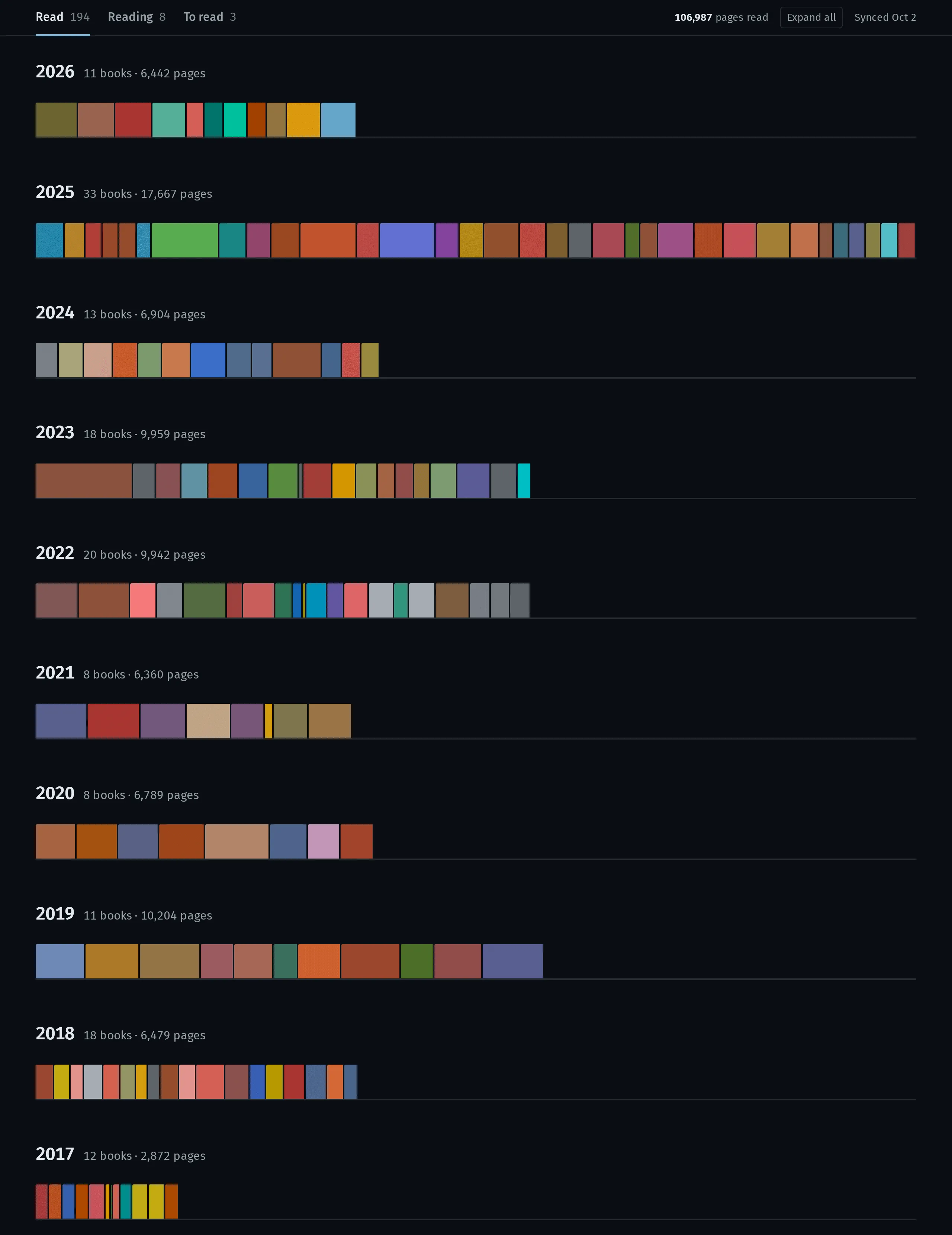
For that screenshot I hid the cover grids so the strips sit on top of each other. On the page each strip is under its year’s heading.
The shared scale is what makes the strips comparable. 2025 was my biggest year, 33 books and 17,667 pages. 2019 had only 11 books, but they were long, and its strip runs past 2018’s, which had 18. A per-year scale would hide that.
The CSS does the sizing:
.spine {
  width: calc(var(--pages) / var(--max) * 100%);
  min-width: 3px;
  padding-right: 2px;
  background: var(--spine);
  background-clip: content-box;
}
--max is the biggest year’s page total. The 2-pixel gap between spines comes out of each spine’s own width through the padding and background-clip, so the biggest year still adds up to exactly 100%. Hovering a spine shows its page count, title and the date I finished it, and tooltips on the right half of the page open leftward so they stay on screen.
42 books have no read date, mostly older entries. They’re grouped under Undated and get no strip, since they span many years and would break the shared scale.
Colors from the covers
The colors carry no data. They’re there so a strip looks like a shelf. Each one comes from the book’s cover, and the obvious way to do that, averaging the pixels, doesn’t work. Many covers are mostly black or white, and averaging a mix of hues comes out brown.
scripts/spine.ts does it differently. It shrinks the cover to 16 by 24 pixels with sharp and converts each pixel to OKLCH. Pixels with a chroma above 0.04 count as colorful. If at least 5% of them are, they’re sorted into twelve 30-degree hue buckets, and the bucket with the most total chroma wins:
const buckets = Map.groupBy(colourful, ([, , h]) => Math.floor(h / (360 / HUE_BUCKETS)))
const best = [...buckets.values()].sort(
  (a, b) => b.reduce((s, [, c]) => s + c, 0) - a.reduce((s, [, c]) => s + c, 0),
)[0]
The hue is that bucket’s chroma-weighted average angle, the chroma is its median times 1.2 and capped at 0.15, and the lightness is its median clamped between 0.5 and 0.74 so a spine never disappears into the dark page or glares off it. A cover with almost no color gets the page’s own cool gray, hue 250 at a chroma of 0.012.
Colors are cached in books.json by cover URL. Goodreads changes the URL when a cover changes, so a sync only downloads covers it hasn’t seen, eight at a time.
The rest is small. Design tokens live in tokens.css, and every color, size and font in the components references them. The site is Astro, TypeScript, fast-xml-parser and sharp, and the only script on the page is the Expand all button.