Turning Up the Quiet Co-Host
Tags:#ios#audioSome podcasts have a loud host and a quiet co-host, and the show doesn’t fix it. I’d turn the volume up for one voice and back down for the other. Gleeman fixes it on the phone. It works on the whole downloaded file, so it can see the entire episode before it decides the gain for any moment of it.
It downloads each episode itself, from the show’s own feed, so the show still gets its download count and its inserted ads. The leveling happens on the phone, and the leveled audio never leaves it.
Measuring first
Leveling is two passes. The first decodes the file and measures its loudness every 100 ms, which I call a hop. Loudness here is the ITU-R BS.1770 kind that LUFS figures use: each channel goes through the K-weighting filter (a high shelf for how the head shapes sound, then a high-pass that discounts rumble), and each hop keeps the mean energy of what comes out. A mono file counts as two identical channels, since it plays through both ears. Both passes stream, so a two-hour stereo episode levels in about 26 MB of memory.
Everything else is built from those hop energies. Four hops make the standard 400 ms momentary block, and the integrated loudness of the whole file uses the standard gates: blocks above -70 LUFS, then those within 10 LU of their mean. On a Mac the engine runs at about 200 times real time, and two thirds of that time is decoding MP3. A phone plans a two-hour episode in about 15 seconds.
Planning the curve
Each hop counts as speech if its 400 ms block is within 20 LU of the file’s integrated loudness and above -55 LUFS. Quieter hops are pauses and breaths. The gain for each hop then comes from the mean energy of the speech hops within one second either side of it:
let radius = max(1, Int((settings.analysisWindow / 2 / hopDuration).rounded()))
let enoughSpeech = min(4, radius)
let baseGain = settings.targetLoudness - integrated
let corrections: [Double?] = (0 ..< count).map { index in
    let low = max(0, index - radius)
    let high = min(count, index + radius + 1)
    let found = speechCounts[high] - speechCounts[low]
    guard found >= enoughSpeech else { return nil }
    let level = Loudness.lufs((energySums[high] - energySums[low]) / Double(found))
    let correction = settings.targetLoudness - level - baseGain
    return min(settings.maxBoost, max(-settings.maxCut, correction))
}
Running sums make each hop’s window two subtractions instead of a loop. A hop with fewer than four speech hops around it gets no value of its own, and the gap is filled with a straight line between the values on either side. That’s what keeps the gain steady through a pause instead of climbing toward the noise floor.
Averaging energy instead of decibels has a useful side effect. Where two voices meet in the window, the louder one dominates the mean, so the curve leans toward turning down at a change of speaker. If the curve is going to be wrong for a moment, I’d rather it be wrong quiet.
The correction is capped at 12 dB above or below the gain that would simply normalize the file. Then it’s smoothed with a one-pole low-pass at 0.3 seconds, run forward and then backward so the curve moves ahead of a change as much as after it. Last, one shared gain is adjusted over three rounds until the leveled file’s integrated loudness lands on -16 LUFS, the usual target for podcasts on phones.
To show what that does, I ported the planner to JavaScript and ran it on the conversation from the engine’s tests: a host at -18 LUFS and a co-host at -30, trading 8-second turns with half a second of near silence between.
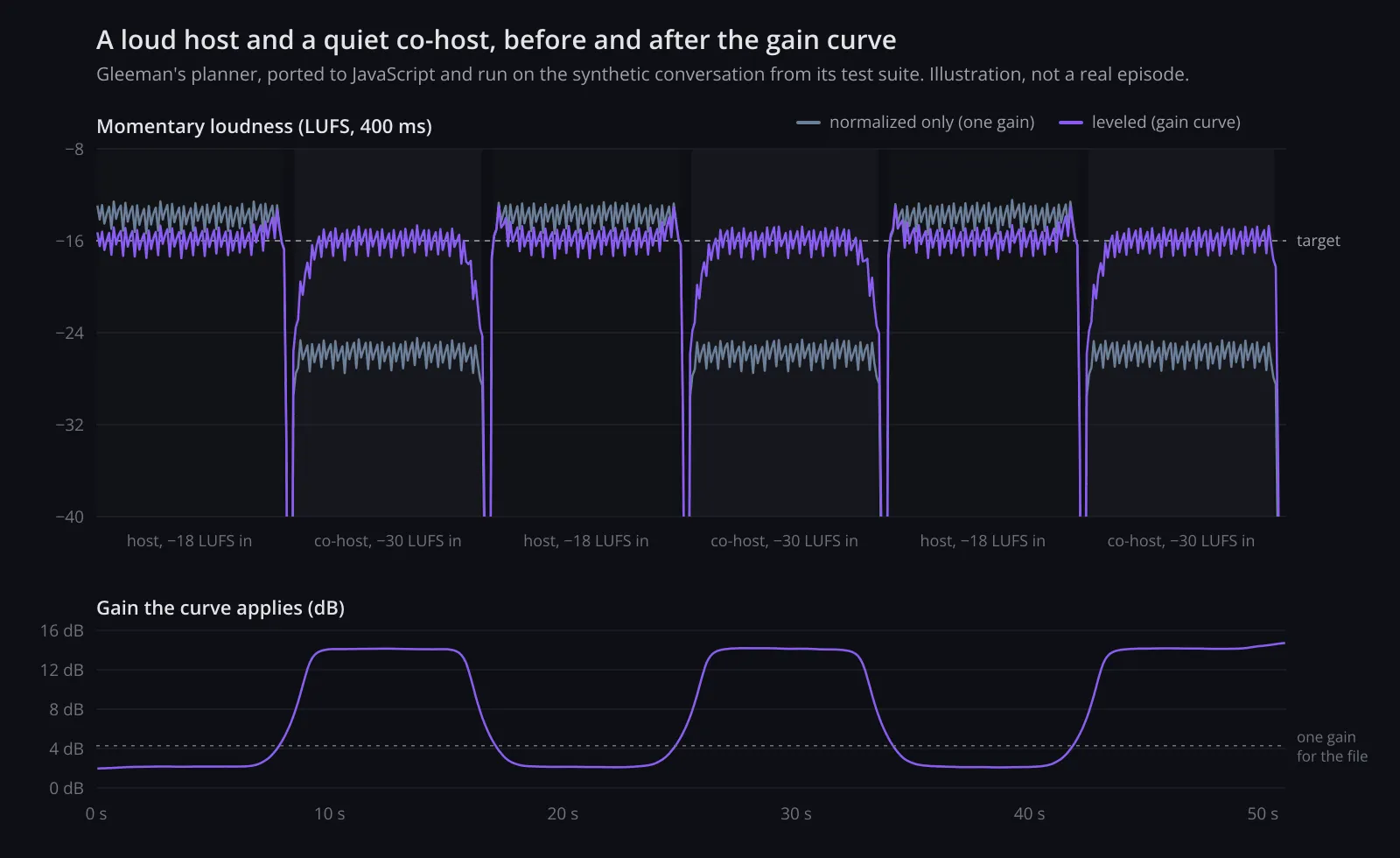
An illustration from my JavaScript port of the planner, applied without the limiter. It’s synthetic test audio, not a real episode.
The ramps are where the turn-down bias shows. The gain rises over about a second as the co-host starts and falls before the host comes back, so the host never gets a boost meant for someone quieter.
Picking the numbers by ear
The defaults are a 2-second window and 0.3 seconds of smoothing. A longer window is steadier but slower to follow a change of speaker. I chose them by listening to one two-hour episode leveled with 2, 4 and 8-second windows, against a copy that was only normalized.
That comparison needs care, because the louder of two copies usually sounds better. gleeman-level, the command-line tool I built before any app existed, takes --compare and writes a second copy brought to the same loudness without leveling, through the same limiter. With the 2-second window, that episode’s loudness range went from 11.9 LU to 4.4 LU.
Playing a curve instead of a file
The command-line tool writes a leveled AAC copy, and encoding that copy costs as much time as everything else put together. The app skips it, along with the second copy of every download. After an episode downloads, the app plans the curve and stores it next to the file: a short header, one 32-bit float per hop, then the pauses. Two hours is 72,000 hops, about 280 KB. The original file is what plays.
The player reads half a second at a time into a processor, which schedules the result on an AVAudioPlayerNode about two seconds ahead:
public mutating func process(_ channels: [[Float]]) -> [[Float]] {
    trim(limiter.process(applier.process(channels)))
}
The applier interpolates the gain in a straight line between the centers of neighboring hops, with vDSP_vramp. The limiter keeps true peaks under -1 dBTP. It estimates them by 4x oversampling, as BS.1770 describes, looks 5 ms ahead so it can turn down before a peak, and recovers over 80 ms. A seek builds a new processor at the new position, and a test checks that half a second after a seek, the output matches what playing the whole file would produce there.
A few smaller decisions came from this setup:
- Turning “Level voices” off plays the curve’s single whole-file gain, through the same limiter, so the two modes match in loudness and only the evening out differs.
- At 1x the time-pitch unit is bypassed, so normal speed is untouched audio.
- An episode can start playing before its curve is ready, and leveling starts mid-play once it is.
- The scrubber is the episode’s loudness, about 5 KB stored beside the download. With leveling on, the original’s outline sits faintly behind it, so I can see what was lifted and lowered.
Cutting pauses after the limiter
Once leveling worked, silence trimming was a short step, since the curve already knew where the pauses were. A pause is a run of hops at least half a second long whose leveled loudness is 28 LU or more under the target. Judging the leveled level matters: a quiet co-host, once brought up, doesn’t count as silence.
While playing, each pause longer than 0.6 seconds keeps 0.4 seconds, 0.2 at each end, and loses the middle, with 6 ms fades into and out of each cut. The trimmer is the last step in the chain. The audio goes through the gain and the limiter in full, and the cut frames are dropped afterward, so trimming never changes the leveling of the audio around a cut.
Dropping frames means the player’s clock and the file’s clock disagree. A TrimMap holds the cuts and a running count of frames removed before each one, and translates in both directions with a binary search. Positions, seeks, resume points and timestamps in show notes all stay in the original file’s time, so turning trimming off never moves my place.
On that same two-hour episode, trimming shortened 1,145 pauses and saved 16 minutes 43 seconds of 1 hour 58 minutes, or 14%. The median cut was 0.6 seconds and the longest 8.1. Measured in the original audio, half the cuts sat 53 dB under the speech, and the loudest one 25 dB under it. The player shows each episode’s saving on a scissors button, and Settings keeps the total.
Feeds
A small Node server on my homelab polls my subscriptions every 10 minutes, with conditional requests, permanent redirects and backoff. The app’s refresh is one request carrying each feed’s address and a hash of its copy, and only the feeds that changed come back, gzipped, for the app to parse with its own parser. The server also proxies Podcast Index search, which signs each request with a SHA-1 of the key, secret and time, so neither ever ships in the app. Node 24 runs the TypeScript directly with node:sqlite and node:http, so there’s nothing to build and no runtime dependencies.
When the app can’t reach the server, it refreshes feeds itself, on open, on pull to refresh and through background refresh, and searches iTunes instead. Each show keeps its newest two automatic downloads, and downloads untouched for 14 days are cleared.
There’s a Mac version too, in its own repo. It uses the same leveling and feed packages with a sidebar, a player bar and menu commands for leveling (⌘L) and trimming (⌘T), and it keeps its own library.